
aidokit
One command. A complete AI-dev workflow.
Scaffold a structured, adapter-agnostic, AI-assisted development workflow into any project —
greenfield or brownfield — with your choice of AI coding CLI. Zero LLM calls. No telemetry. Reproducible.
Quick start → · Concepts · Adapters · Scenarios · CLI reference




What is aidokit?
aidokit is a command-line tool that scaffolds a structured, AI-assisted development workflow into any software project — in one command. It writes the same workflow tree no matter which AI coding CLI you use: Codex CLI, GitHub Copilot CLI, or Claude Code. It makes zero LLM calls itself. It is the productisation of the AI Dev Orchestrator Spec v2.0.
Where most AI coding setups are ad-hoc — a single CLAUDE.md here, a handful of hooks there — aidokit ships a complete, role-separated workflow with hard stops between phases, persistent task graph, and per-role MCP sandboxing. Everything emitted is plain text. You can read it, diff it, and delete what you don't need.
Why aidokit?
Zero LLM callsaidokit itself never talks to a model. Every decision is deterministic; every CI run is hermetic. |
Deterministic & hermeticThe same inputs always produce the same tree. A byte-compare gate in CI catches drift before it lands. |
Adapter-agnosticOne workflow, your choice of CLI. Switch freely between Codex, Copilot, and Claude Code without rewriting your project. |
Stack-awareStack packs detect Node, TypeScript, Python, React, and Go projects and emit tailored testing + lint conventions. |
Brownfield-safeRead-before-write everywhere. No file is overwritten without a diff. Existing conventions are preserved. |
Migration-firstEvery breaking change ships withaidokit migrate. Upgrading the kit never means rewriting it.
|
In 60 seconds
%%{init: {
  "theme": "base",
  "themeVariables": {
    "fontFamily": "ui-sans-serif, system-ui, sans-serif",
    "primaryColor": "#eef2ff",
    "primaryTextColor": "#0f172a",
    "primaryBorderColor": "#6366f1",
    "lineColor": "#475569",
    "clusterBkg": "#f5f6fb",
    "clusterBorder": "#cbd5e1"
  }
}}%%
flowchart LR
  classDef actor    fill:#ede9fe,stroke:#6d28d9,color:#1e1b4b
  classDef cli      fill:#e0e7ff,stroke:#4338ca,color:#0c1f4a,stroke-width:1.4px
  classDef artifact fill:#ecfeff,stroke:#0891b2,color:#0c4a6e
  classDef external fill:#fdf2f8,stroke:#be185d,color:#500724

  dev(["you"]):::actor
  init["npx aidokit init"]:::cli
  emitted[".codex/ + .copilot/ + .claude/<br/>docs/ · agent-artifacts/<br/>.beads/ task graph"]:::artifact
  ai["your AI coding CLI<br/>(Codex · Copilot · Claude Code)"]:::external

  dev --> init --> emitted --> ai
Quick start
# In your project directory
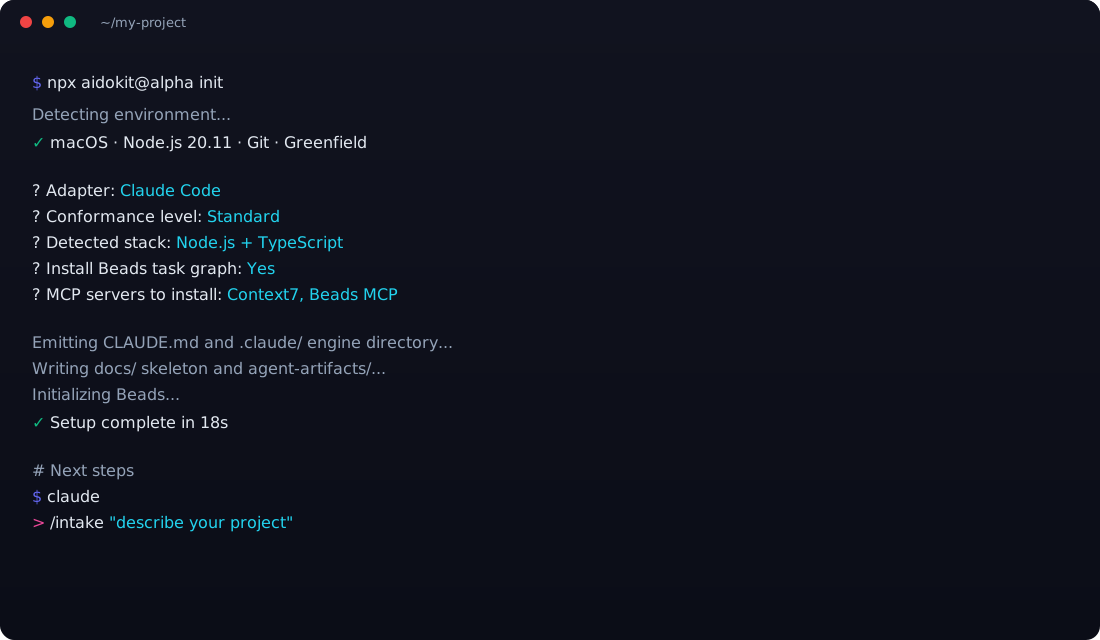
npx aidokit@alpha init
That's it. The CLI walks you through three prompts (adapter, conformance level, stack pack), then emits the workflow tree. Then:
# Open your AI coding CLI in this directory and start working
claude
> /intake "describe your project in a paragraph"
🧭 Not sure which path fits you? Try the interactive scenario picker → — pick your CLI, tier, and stack; get a copy-paste playbook.
First-party adapters
| Adapter | Conformance | What you get |
|---|---|---|
| Codex CLI |  |
Lean surface: agent-rules file, docs scaffold, Beads task graph. Same workflow at the level Codex CLI can support — no hooks or output styles, so watchdog/styling ship as prompt-level guidance. |
| GitHub Copilot CLI | |
Same scaffold targeting Copilot's CLI. Lands the workflow without forcing a tool switch; Minimum follows from Copilot CLI exposing neither hooks nor output styles. |
| Claude Code |  |
Full hook system, slash commands, MCP servers, output styles, two-stage review. Strict follows from Claude Code exposing deterministic hooks and output styles. |
The conformance level each adapter declares is a consequence of what its target CLI can physically support — not a quality ranking. See docs-site/docs/adapters.html for full feature parity tables.
Documentation
| If you want to… | Go to |
|---|---|
| Get started in 5 minutes | Quick start |
| Understand the core ideas | Concepts |
| Pick the right adapter | Adapters |
| See your stack supported | Stack packs |
| Add aidokit to an existing project | Brownfield guide |
| Find every command + flag | CLI reference |
| Understand the architecture | .docs/ARCHITECTURE.md |
| See what's coming in v1.0 | .docs/ROADMAP.md |
| Read the project changelog | CHANGELOG.md |
| Contribute | Contributing guide |
Status
v1.0 RC — the v0.5 Beta shipped on 2026-05-25 (see CHANGELOG). Remaining v1.0 scope: multi-adapter projects, aidokit search, --dry-run, capability declarations, signed npm packages. Track progress in .docs/ROADMAP.md.
Built with these principles
- Plain template files, no template engine.
- TypeScript contracts, not YAML configs.
- Data-driven catalogs, edited as TS arrays.
- Conformance declared AND verified — drift fails CI.
- Migrations are first-class — every breaking change ships with
aidokit migrate.
See AGENTS.md for the full rules of engagement when contributing.
License
Apache-2.0. Copyright © 2026 aidokit contributors.
Made with care for teams that ship.